NSFW
NSFWIntroducing Video Optimizer: The Simple Way to Shrink and Subtitle Your Videos!
Looking for an easy way to make your video files smaller without losing quality? Or perhaps you need to "burn" subtitles directly into a movie so they play on any device? Our updated Video Optimizer tool is here to help!
Link
I’d love to hear from you! Drop your feedback, bug reports, or general opinions in the comments below.


Looking for an easy way to make your video files smaller without losing quality? Or perhaps you need to "burn" subtitles directly into a movie so they play on any device? Our updated Video Optimizer tool is here to help!
What can this tool do for you?
 Shrink Huge Files: Automatically optimizes your videos to save space. Perfect for sharing in the forums, email, or saving storage.
 Professional Subtitles: Upload an .srt or .ass subtitle file along with your video, and the tool will permanently "burn" them into the picture.
 Mobile & Data Friendly: Choose between Quality Mode (keeps things looking sharp at 480p-1080p) or Smaller Mode (forces 480p to save maximum data).
 Modern Formats: Supports high-tech encoding like H.264, VP9, and even the brand-new AV1 for the best possible compression.
 Audio Control: Choose to keep the original sound or completely mute the video if you just want the visuals.
 Smart Splitting: If you have a file size limit (like 80 MB), the tool can automatically split your video into parts, or you can choose "Never split" to keep it as one file.
User-Friendly Features:
- Private by Default: All uploads are private. No one sees your videos unless you share the link.
- Works on Any Device & on Mobile: Built as a "Progressive Web App," meaning you can "install" it to your home screen, and it works smoothly like a regular app.
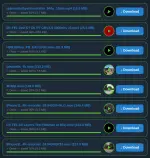
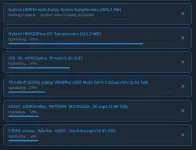
- Real-Time Progress: Watch a live progress bar as your video processes in the background. You’ll even see a tiny preview icon of your video while it’s in the queue.
- Automatic Cleanup: To keep the server fast, all temporary files and videos are automatically deleted every 12 hours.
Link
720p.phcorner.org
I’d love to hear from you! Drop your feedback, bug reports, or general opinions in the comments below.
 nakakapagupload na ng matiwasay